 EduSchoolConnect
Tuition fees: invoice the whole school and follow every unpaid balance
Each student has their own fees. Invoices are generated for everyone, payments are recorded by family, and parents are reminded before and after the due date.
- Monthly, quarterly, yearly or one-off fees
- One payment for several children, with one receipt
- Automatic reminders 7, 3 and 1 day before, on the day and when late
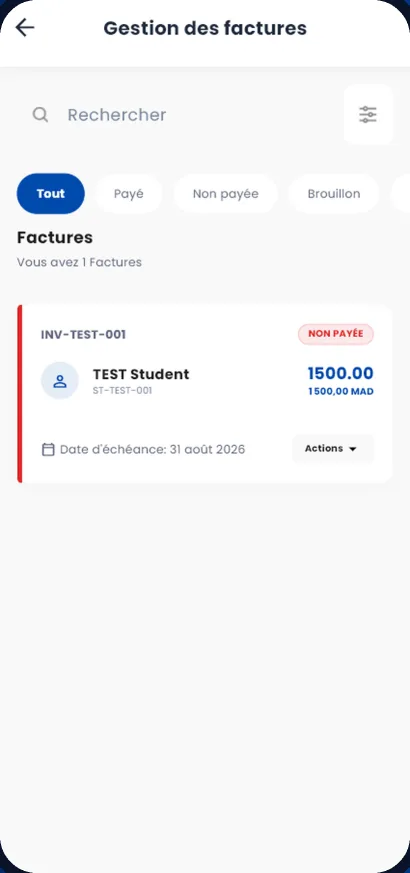
Invoice
You create your fee catalogue (tuition, transport, registration, options), then assign fees to students, one by one or in bulk.
- Assign fees to a whole class at once, with a preview before confirming and an undo
- Starting month of your choice: a student who joins mid-year is only invoiced from their arrival
- The month’s invoices generated automatically for the whole school
- Fees paused, changed or ended without touching invoices already issued
- One-off charges added to a student (outing, supplies, amount already owed)
Collect
Payments are recorded at the desk, in cash, by cheque or by bank transfer.
- Partial payments accepted, the balance due is recalculated
- One payment split across several children’s invoices, with one receipt
- Discounts, cancellations and credit notes recorded
- Invoices and receipts as PDF
Remind
Families automatically receive a reminder for each unpaid invoice.
- Reminders 7 days, 3 days and 1 day before the due date, on the day, then when late
- By email, phone notification and in the app
- List of unpaid balances family by family, exportable to Excel
- Family account statement and a payment notice to print
When a student changes class or leaves
Their fees are not changed silently: the application proposes the changes and a person confirms them.
- Proposal of the fees to stop or add
- Future invoices cancelled or credited, never edited after being issued
Spreadsheet and receipt book, or EduSchoolConnect
| Spreadsheet and receipt book | EduSchoolConnect | |
|---|---|---|
| Monthly invoices | Prepared by hand | Generated for the whole school |
| Siblings | One receipt per child | One payment, one receipt for the family |
| Unpaid balances | Pieced together at month end | Up-to-date list, family by family |
| Reminders | Phone calls one by one | Automatic reminders before and after the due date |
Frequently asked questions
Can parents pay online?
Not yet. The school records the payments it receives in cash, by cheque or by transfer, and parents see their invoices and their status in the app.
Can invoicing start in the middle of the year?
Yes. You choose the starting month of each fee, and amounts already owed can be added as one-off charges.
Are reminders sent to every parent?
They are sent to the parents linked to the student whose invoice is unpaid, by email, notification and in the app.
Can we issue credit notes?
Yes. A paid invoice that has to be cancelled gives rise to a credit note, and the family’s balance is updated.
See EduSchoolConnect with your own classes.
A demo tailored to your school, with no commitment. We answer your questions about your fees, your classes and moving your existing data.
Or contact us: +212 664-484584 · [email protected]